MacWannaBe

Install Mac OS X On PC Hardware: PC & Laptops.

Update Mavericks 10.9.3 from 10.9.2

So, Mavericks 10.9.3 just came out and I decided to update the OS although 10.9.2 was doing quite well. Things needed for updating without problems are: AppleACPIPlatform.kext, AppleIntelCPUPowerManagement.kext (need to be patched), Wifi needs to be patched with device id again. So, the best is to have the external USB hard drive with Mavericks installed

Snow Leopard 10.6.6 On i5 460M Gateway Laptop NV55C26U

2014-03-30 Revised tutorial to get full QE/CI for HD5700 per information on Insanelymac.com. The unsupported old laptop now is fully functional. To prepare external USB hard drive to install Mavericks 10.9.2 with or without Mac is here. Since the partition format is MBR (Master Boot Record), you can use EasyBCD or Chameleon for dual booting.

How To Update Mavericks 10.9.2 Without Losing en0 built-in on Envy 4 i5-3317u

After updated to Mavericks 10.9.2 from 10.9.x, we may lose the en0 – Ethernet built-in which causes iCloud, iMessage, Facetime and Apps Store NOT working. To prepare for this not to happen, this is the way I did my update successfully without losing the Ethernet EN0 settings by the new 10.9.2.

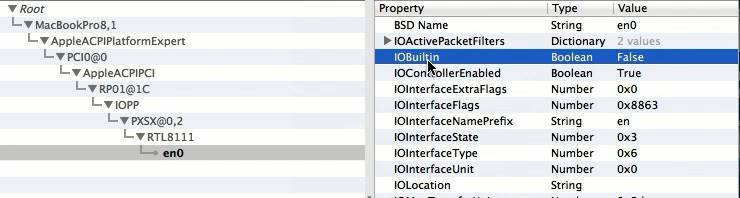
How To Fix Ethernet en0 Built-in “FALSE” Mavericks 10.9.2

en0 false

When our Mac OSX doesn’t allow us to access the apps store or iMessage and iCloud don’t work, it’s the Ethernet EN0 is not registered as built-in. There are many tutorials on the internet, but if we’re not savvy with dsdt editing, this is the best way to fix this problem. Tools needed are: Osx86Tools