Snow Leopard 10.6.8 On Lenovo G770 i5 Sandy Bridge Laptop
By idog. Filed in Sandy Bridge 12,728 viewsTags: 10.6.8 Lenovo G770 i5 HD3000
May 17, 2012 If you’re not familiar with chameleon, there’s a way to dual boot using windows 7 and EasyBCD on 750GB hard drive here.
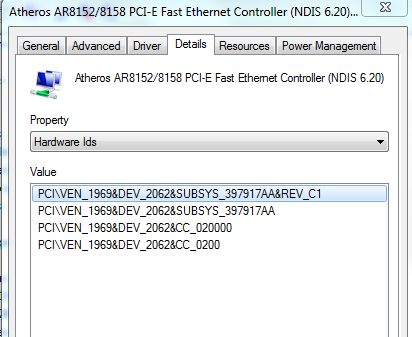
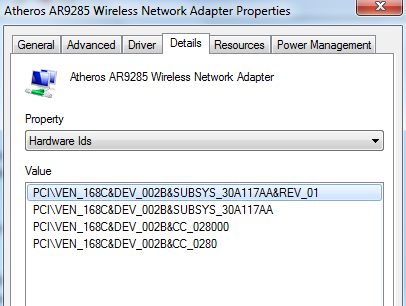
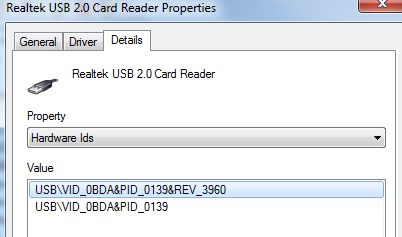
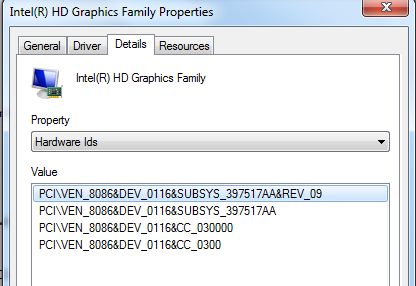
I’m writing up a tutorial on how I intalled Snow Leopard 10.6.8 with full QE/CI/CL & resolution 1600×900 & Atheros Ethernet/Wifi & sleep working on my Lenovo G770 10372LU laptop model. I need these software to make it work. I think this laptop is the best for Snow Leopard 10.6.8 and Lion at the moment. This Lenovo has the important devices that work/not work with Mac OS X at the moment, please identify your hardware because G770s do come with different devices. Check for Graphicsid, Wifiid, Ethernetid, SDcard readerid. My SDcard id is not supported at the moment. Thanks to many techs savvy on the net like Maldon, Bcc9, Kyle_c, I could get these going so well. MAKE SURE TO BACK UP THE IMAGE OF THE HARD DRIVE BEFORE DOING ANYTHING TO THE LAPTOP. Software and hardware needed. * iboot-legacy, multibeast, updatehelper * An external USB hard drive: we will need this one over and over for installation, experimenting snow leopard 10.6.8 and lion then restore it to the internal hard drive after we’re happy with our MAC OS X. DON’T install on the hard drive without knowing if it’s going to work. * Patched kexts for Ethernet & Wifi & trackpad2011-12-26 For those who want to boot from WDC 750 GB, I use the original MBR formatting on the hard drive, use Windows 7 to shrink a partition for Snow Leopard 10.6.8. Use an external USB hard drive to load Snow Leopard 10.6.8 or LION first, then restore the partition to the internal hard drive partition. When done, remove the hard drive, connect this hard drive to an external USB, install Chameleon on the 100MB MBR partition, copy the Extra folder to this MBR partition (after Chameleon installation). Make sure we can still boot the drive (in USB connection), then put it back to the LAPTOP, it will boot using Chameleon boot loader.


Thursday, May 17th 2012 at 9:56 pm |
Hi,
I have used this process, your process and it works great. There is one thing I noticed. Random crashes. Where I will just have to reboot. Strangely enough, i found these only happen when i use the Ethernet port. With wireless, it is rock solid. Is it possible i need a kext other than what you have here?
Thanks a lot.
Thursday, May 17th 2012 at 10:21 pm |
Hello,
I haven’t used ethernet much to connect to the internet so I don’t notice the crashes. If the ethernet works, the kext you’re using is correct, when it crashes, it’s the software you’re running. Why not Lion?
Cheers,
Thursday, May 17th 2012 at 11:57 pm |
Hi,
I am looking at your lion install and have created the bootable usb. Using LION 10.7.2 and MY Hack. But some of the instructions on what to do with the extra folder is confusing.
Also, I understand what you are saying about the kext. But I have been doing heavy multitasking and copying large files to and fro across the lan using wireless with 0 crashes. If I connect via Ethernet, then start a transfer across the LAN and say, browse the web. It will crash. I didn’t believe the results either.
Thursday, May 17th 2012 at 11:57 pm |
Ooops BTW thanks for your timely response. And this site is great.
Saturday, March 31st 2012 at 7:46 pm |
Dog, great tutorial and videos. Before I give this a shot, I wanted to ask a few questions to make sure that this will work well for me:
1) Will this setup (once completed via dual boot option #2) be capable of using MacOSX’s Software Update utility to install future Snow leopard OSX updates, or will I have to stay at 10.6.8? (It’s no big deal, just curious if future updates for either Snow Leopard and/or Lion will require additional work to install on the laptop).
2) Is there any special tricks to backing up the dual boot system so that I can easily restore the entire setup without repeating all the steps again? In addition, would a single boot (MacOSX only) simplify the backup/restore significantly?
FWIW, I would like to use continue to use SuperDuper for my full backup/restores, and TimeMachine for my incremental ones… I am not opposed to using other software if necessary, mainly curious if superDuper would/should work for full backups/restores.
NOTE: My main concern is to have a simple restore solution in case the hard drive fails, be SUperDuper or some other package you recommend. I figure it’s important to know before starting since HDD manufacturer’s don’t make ‘em like they used to
3) Speaking of HDD failures, is this setup at all tied to the WDD 750GB drive? For example would I be able to upgrade to an SSD or hybrid in the future by doing a simple restore (sort of tied to question 2 in a way).
Thanks in advance, and again, great job on the tutorial.
Monday, April 2nd 2012 at 10:07 am |
I believe Snow Leopard ends @10.6.8, Lion is the new operating system and it doesn’t upgrade with hackintosh at all because we have to buy the OS @29$ on line.
Very good question, I haven’t thought of this yet, I backed up the hard drive BEFORE the Mac OS X installation using Windows 7 image back up. It doesn’t work after we installed Chameleon over the MBR. The best is to try Tom’s dual boot with Easybcd (which does keep the windows MBR), back up the windows images only.
This set up is for all Hard drives, but WDC750 seems to be the most problem ones. SSD, I have no idea.
I you install LION, it will upgrades well without doing anything, the only problem you will have is the AppleHDA.kext that needs to be removed before reboot for the VoodooHDA.kext to work.
It’s good that you do research before messing with the original Hard drive. That’s why I strongly recommend to install Mac OS X onto an EXTERNAL USB HARD DRIVE and back up all original Hard drive images.
Friday, March 9th 2012 at 3:05 am |
Having installed the UpdateHelper, rebooted, installed the 10.6.8 combo, installed MultiBeast, copied the Extras_fixed.zip file to the Extras folder (bit of a pain as I was getting a “The operation can’t be completed because you don’t have permission” error when trying to copy them – I drag/droped them instead) and having run Kext Utility to update the cache, I rebooted and the boot hangs on “[ PCI congiguration begin ]“.
Where di I go wrong?
Friday, March 9th 2012 at 9:15 am |
I’ve seen this one before, but I forgot, since there are new multibeast and chimera, the best is to try to get the old chimera 1.5.3 or 1.5.4. Are you installing 10.6.8 directly to the hard drive or USB external drive?
Tuesday, March 13th 2012 at 2:37 pm |
Installing to an external hard drive. I’ve switched to trying to install Lion, but that’s not going too well either (as you’ll see here: http://www.dognmonkey.com/techs/install-lion-on-lenovo-laptop-without-snow-leopard-using-unibeast.html#comment-521)!!
I’ll try giving it a shot with the older Chimera versions.
Tuesday, March 13th 2012 at 2:56 pm |
Hello Tom,
I just re-installed my laptop with LION and updated it to 10.7.3 with facetime working. It’s so easy and fast. I’ll write it up soon.
Cheers,
Friday, March 23rd 2012 at 3:08 pm |
I would just like to say, thank you SO MUCH for this. I am using an Asus N53SV laptop, with Core i7-2630QM processer and HM65 bridge. Using your DSDT and the EFI string within your com.apple.Boot.plist, I was able to enable full resolution and QE/CI in 10.6.8. I have been trying for months to get this to work. Again, thank you so much!
Wednesday, March 7th 2012 at 8:03 am |
Hi idog, i have lenovo G570GH it’s almost the same i5 2310m, but 15.6″ 1366×768 resolution, your dsdt.aml have torbo boost support because i test it with cinebench and i saw that the performance was way bellow windows7 performance. I saw this link on tony
http://tonymacx86.com/viewtopic.php?f=259&t=42503&start=20 but i don;t know if it’s working. Thank you very much.
Dragos
Wednesday, March 7th 2012 at 9:44 am |
Dragos,
If the display is good and not tearing, artifacts, then the dsdt.aml is working. About the performance, you have to compare it with other Mac OS X and not with Windows.
Cheers,
idog
Wednesday, March 7th 2012 at 9:57 pm |
I have the same configuration as you, i5 2310m 2.3ghz, 8gb ddr3 1333 2x4gb Corsair, Intel HD 3000, if you ran a bench like cinebench or geekbench
http://www.primatelabs.ca/geekbench/ tell me what score you have to compare it with mine. Thank you.
Friday, March 9th 2012 at 7:50 am |
Monday, December 26th 2011 at 11:10 am |
Cool, thanks very much.
So i am going to put the 750 inside the 770
Partition the drive in 2
Install Windows on the 2nd partition?
Then take the drive out put it in USB enclosure
install osx
Put back in 770
all good?
Monday, December 26th 2011 at 1:22 pm |
I don’t know if you can do it now since you already format with guide. You have to partition the whole drive to mbr. Only 2 partitions, 100mb and the rest is windows, try to make it the same as the original drive. Then use windows to shrink the partition for snow leopard
Monday, December 26th 2011 at 4:40 pm |
Well, I have an actual Windows 7 64 Ultimate disk. If I put back in the 750 and run the Windows installer and use that to partition the drive, will that over write the boot sector?
Im just confused the order to do things.
Monday, December 26th 2011 at 6:38 pm |
Do you know what partition you have on your drive right now? GUID or MBR, use your usb mac to check, windows 7 will create a 100mb boot partition on an MBR drive automatically, it it does that, then you’re done, because the bios will boot windows from this MBR 100mb partition.
Tuesday, December 27th 2011 at 6:58 am |
Right now, it is one partition exfat with a master boot record.
From what I would install Windows 7 and then shrink the partition. I know windows 7 will make that 100 mb system partition.
Then after Windows 7 is installed I shrink the partition leaving some free space for OSX?
Then put it in a usb drive and install osx?
Tuesday, December 27th 2011 at 7:03 am |
EDIT
Right now, the 750 is one partition exfat with a master boot record.
From what I understand I would install the drive into the g770.
Install Windows 7. I know windows 7 will make that 100 mb system partition.
Then after Windows 7 is installed I shrink the partition leaving some free space for OSX?
Then put the 750 into a usb enclosure and install OSX like last time?
Tuesday, December 27th 2011 at 8:16 am |
Leave the 750 in the laptop, restore from the USB 160gb drive to it, then remove it and load chameleon onto the 100mhb or you can put it on usb and install mac osx on it, it just take longer than using restoration.
Friday, December 23rd 2011 at 7:11 pm |
There is just one last thing. Has anyone been able to get this to boot from the internal drive?
After getting everything sorted on the USB drive, then wrecking it by installing fan control, ( I actually did this on a real Intel Mac once before), I decided to try to do it on the internal drive. Giving the whole Internal drive to OSX 10.6.8. I followed the same steps that lead me to success on a USB drive and got to the reboot after installing mult-beast extra folder etc etc.
Upon reboot, I would get boot 0 errors. So, I put in the iboot disk thinking I would just boot it that way. But it would just freeze at the apple logo right after selecting it in iboot.
I know there is an issue with the 4096kb drives but is it also possible additional extensions need to be loaded in order to install on and boot from the internal SATA drive?
Friday, December 23rd 2011 at 8:52 pm |
Noob,
If you want to boot from internal hard drive, just make a usb flash drive boot disk or idog cd boot disk. Look at the 3 ways I described in my tutorials for dual booting. I’m booting from my internal hard drive, dual boot.
Saturday, December 24th 2011 at 4:17 am |
Hello,
Wow, I had no idea it was Christmas Eve. Hope you are having a good Holiday,
I have done through the install so many times. So far I’ve gone through it 3 times on the USB drive without fail and without looking at the instructions. I followed the same exact steps only this time, installing it to the internal drive with nothing else on it, and it will not load even with the iboot cd. Strange.
Saturday, December 24th 2011 at 4:21 am |
Oh, I just want to wanted to clarify … when i said 4096k drives.. I meant harddrives with 4k sectors. http://forge.voodooprojects.org/p/chameleon/issues/129/
Saturday, December 24th 2011 at 9:04 am |
It’s not just the drive, it’s the way the bios is talking to the hard drive on Lenovo. I couldn’t even dual boot using the conventional way with easybcd using a different drive, so FORGET about loading it directly to the internal drive. The bios is designed to look at a certain MBR and if it’s not there, you can’t boot from the hard drive. I’ll put in a 500GB seagate today and just load 10.6.8 to see if it can boot internally with internal hard drive..
Saturday, December 24th 2011 at 6:25 pm |
Hi,
I ended up taking the 160 gig out of the usb enclosure and popped it inside the lenovo. Booted right up. Other people have been having similar issues. It seems to be with hard drive that have 4k sectors instead of the 512..
Any luck on getting the USB 3.0 port to work? How about the card reader?
I love this thing now.. i can’t sleep or stop using it.
Sunday, December 25th 2011 at 10:16 am |
It’s not the Hard drive, I could dual boot from the hard drive using chameleon. The only important thing is that the bios is designed to boot from MBR (master boot record), the original drive is loaded with windows 7 and formatted with 100mb of MBR, I loaded the Chameleon over this 100mb and it booted fine with windows 7 and Lion. The only thing I needed to do was to remove the drive from the laptop, hook it up on the USB, use the chameleon boot loader, install it on the 100mb drive and put it back into the laptop, my wdc 750 is booting with chameleon now.
Friday, December 23rd 2011 at 11:54 am |
Something I noticed … I’ve been at this all night
You say;
“Finish with the multibeast installation, it will create an “Extra” folder in “snowubl1068″ partition with all extensions and smbios.plist com.apple.Boot.plist and generic DSDT.aml.”
However, never is DSDT.aml and smbios.plist created.
I have used the ones in the download section but there are so many versions of the extra folder as well as a separate DSDT.aml and a separate smbios.plist and com.apple.Boot.plist.. I am not sure which combination I used to make it work.
Frustrating. Any ideas why ?
Friday, December 23rd 2011 at 1:58 pm |
Hello Noob,
If you use multibeast installation, it should create an extra folder, I believe dependent upon which options you selected, you don’t see the smbios.plist or DSDT.aml (if you don’t select smbios option for macbook you won’t have it, or if you don’t select have dsdt.aml you won’t have dsdt.aml). Either way, it doesn’t really matter, all you care about is an “extra” folder in the directory. Just download the “extra_fixed”, extracted and copy the whole “extra” (extracted) folder over the current “extra” folder and you’re done. I have 2 “extra” folders : the first one doesn’t have dsdt.aml fixed & for 10.6.8 [idog extra folder] and the one that for both 10.6.8 & lion with dsdt.aml fixed. Try the 10.6.8 first, if it works then just download the dsdt.aml and replace the one in the extra folder to fix the artifacts (for 10.6.8). It’s been a while, sorry for the confusion.
Cheers,
idog
Friday, December 23rd 2011 at 2:32 pm |
Idog,
Thanks for the reply. I am going through the install again.
This time I am going to do exactly as you say.
I am actually up to the MultiBeast install.
I am not putting any DSDT.aml on the desktop.
I check only the options shown above.
Then install.
Install Success
The Extra folder created by mutltibeast does not contain com.apple.Boot.plist
I copy everything contained in your extra.zip (the original one) overwriting ALL.
Run Kext Utility
All done.
Reboot without iboot cd in.
Get apple logo and it is booting
Awesome I am in with the graphics
But my keyboard and track pad do not work.
The new version of MultiMan does not have those 2 options
AHHHHH
Friday, December 23rd 2011 at 2:54 pm |
It’s all sorted I installed the ps2kExts and WPA2 kExts… Wow.. This is awesome! Thanks to you, I have a Mac Book Pro!
Friday, December 23rd 2011 at 3:12 pm |
I’m glad you got it… A few nights of work and you have a potent $500 Mac Book Pro… It does feel good, doesn’t it?
Friday, December 23rd 2011 at 7:05 am |
Well, I think I found the solution to booting from the hard drive.
http://tonymacx86.com/viewtopic.php?f=7&t=41564
Friday, December 23rd 2011 at 1:56 am |
Hello,
I followed your instructions to a “T”. The only difference is, I am using the internal harddrive. This is going to be MAC only no Windows.
After running Multi-Beast 3.10.0, I chose the options you show. However, Voodoo PS/2 Controller and Voodoo PS/2 Track Pad are not an option. I used the Kext Utility to update the extension and rebooted. But I do not get any other video options other than 1024×768.
I continued to follow along with your instructions and installed the kexts for Ethernet and Wireless. Ethernet was working prior to running Multi Beast but Wifi never works. No device appears.
Any help would be appreciated.
Thanks
Friday, December 23rd 2011 at 12:33 am |
Hello,
I was wondering if all the kexts were in your extra_fixed folder for snow leopard.
So once I copy over the files in the extra (fixed) folder to the Extra folder, I can reboot and everything will be working?
Tuesday, December 6th 2011 at 11:41 am |
Good work mate, I managed to install Lion on my Lenovo V570 quite some time ago whilst it was still in beta stage but I’m not so good at laying out the whole process like you did here. Great Stuff!!!
Tuesday, November 1st 2011 at 9:01 am |
Hey I followed your tutorial, but I got stuck at the end because when you format the HDD via the Mac OSX Snow Leopard DVD, how can you get your Windows back? You formatted the hole Disk right? I would really appreciate it, if you would help me.
Thank you in advance.
Tuesday, November 1st 2011 at 2:56 pm |
Hello BlackDroid,
I did everything on an external usb hard drive, then there are 3 ways of dual booting this Lenovo because of the “Chainbooting error” from easybcd. I used the version 2, which is NOT formatting the hard drive, keep everything in place, just make a partition for snow leopard, restore the usbsnowleopard over the partition. Tell me exactly step by step on what you did with your system and what’ model it is.
Wednesday, September 28th 2011 at 8:54 pm |
can i install this on a asus laptop p6200…..intel pentium…..3gb ram 500gb hd…..
64bit..win7….intel hd graphics…..atheros ethernet inside……213.ghz…high defintion
audio…??? i would appreciate a answer as soon as possible
Wednesday, September 28th 2011 at 10:27 pm |
yes you can, but not on this tutorial, find out which hd graphics ID you have, I’ll post the other tutorial on my other laptop P6200. You may not have full QE/CI but native resolution.
try this one
http://www.dognmonkey.com/techs/snow-leopard-10-6-7-on-t6500-gateway-id5822u-laptop.html
Thursday, September 29th 2011 at 9:18 pm |
these r my graphics whick mulitbeast do is use
Name Generic PnP Monitor on Intel HD Graphics
Current Resolution 1366×768 pixels
Work Resolution 1366×728 pixels
State enabled, primary
Monitor Width 1366
Monitor Height 768
Monitor BPP 32 bits per pixel
Monitor Frequency 60 Hz
Device \\.\DISPLAY1\Monitor0
Intel(R) HD Graphics
Memory 1238 MB
Memory type 2
Driver version 8.15.10.2302
Thursday, September 29th 2011 at 10:34 pm |
you laptop you can try iboot 3.1.1, about the graphics, you should do this – right click my computer – properties-system devices-graphics-intelHD- find device id – I think your is the same id as my gateway 0x2A428086 (8086 is intel 2A42 is device id). Anyhow, just follow the instructions, try to install snow leopard to an external usb as I use and then we can see how to get you going. I’m using Mac OS right now, so I can’t tell you exactly how to find the device id on your computer.
Thursday, September 29th 2011 at 11:21 pm |
does this have to be on external cuzz i have 2 extra internals?
Sunday, September 25th 2011 at 5:25 pm |
So here is my current setup process:
1. Im using “iBoot Legacy: Boot CD for Unsupported CPUs & GPUs – 10.6.x only” as directed in your page.
2. I Then install OSx 10.6.3
2a) I partition the HD to GUID and format as Extended (Journaled) (1 single partion)
3.Once the install is complete, I reboot with iBoot and select “ERICSHD” to boot to OSx 10.6.3
4. Using an external HardDrive. I copy all of the files into the desktop under a folder called MAC FILES. (The files in the folder are the “extra” you provided, UpdateHelper, OSX update 10.6.8 and Multibeat )
5. I then install UpdateHelper and reboot. (following the same process as number3)
5. At this moment OSX still boots fine. Then I install the update 10.6.8.
5a) Once the update is complete I run Multibeast with all the options listed above just as your images.
5b)Once Militbeast is complete, I replace the Extra created on my HD with the one you provide.
6. I reboot using iBoot then I selected “ERICKSHD” and OSX hangs in the apple logo., If I try to reboot directly from the HD it hangs nothing happens and I get a BOOT error.
I have also tried running multibeast just with the Audio and Mouse drivers after the OSx updates and rebooted and It hangs on the apple logo.
So looks like the issue is with in the OSx 10.6.8 update and Multibeast.
Sunday, September 25th 2011 at 6:16 pm |
Hello Eric, I don’t think you did anything wrong, the only problem is that muitibeast doesn’t make the partition as bootable, I create an iso boot disk for both 10.6.8 and Lion, download this one, unzip it and burn to a CD, boot from this CD and at the menu screen select your drive and boot from it, it should come up fine.
http://www.mediafire.com/?5rt68kmrcf12fi9
then you have to install boot loader chimera 1.5.3 or multibeast 3.8 again, just select bootloader chimera, after installation, copy my Extra folder over again, run kextutility and it should boot straight from the hard drive, no more iboot.
Cheers,
Idog
Sunday, September 25th 2011 at 8:27 pm |
Ok, So your boot CD works great. However, I still can not boot directly from the HD.
1) So after installing the OSx 10.6.8 update and Multibeast. I reboot with the BOOT cd your provided. I select my drive and OSX 10.6.8. loads fine.
2a) I then Installed Chemara 1.5.4 ONLY from multibeast 3.8. I copied and replace the Extra folder again and run Kextutility. When I try to reboot from the HD, I get the following Error:
boot0:GPT
boot0:test
boot0:test
boot0:GPT
boot0:test
boot0:test
boot0:error
2b) I also just trying installing chimera 1.5.4 by it self(with out multibeast) and replace the files. When I boot I get the same issue.
2C) I also just trying installing chimera 1.5.4 with out replacing your files, and I get the same boot error.
The good thing about all this, is that I can still boot with your CD. I don’t need to reinstall everything again. Also Looks like the wireless, network, video and CPU are all detected just FINE. which is AWESOME MAN. Just need to get the hd boot working and I’m all set.
Any Ideas?
Monday, September 26th 2011 at 9:23 am |
Eric,
Google for boot0:error, try these and let me know if they work. Please click +1 for our website google search. Thanks.
http://tonymacx86.blogspot.com/2009/11/how-to-install-chameleon-manually-from.html
http://www.insanelymac.com/forum/index.php?showtopic=22844&pid=199372&mode=threaded&start=#entry199372
Tuesday, September 27th 2011 at 9:15 pm |
iDog,
I have not had a chance to try any of the options but I will keep you posted as soon as I get the boot working. Its working nicely, all my friends that have real MACs are so soo Jealous that I payed less then quarter from what they payed.
I do thank you greatly for all your information.
Wednesday, September 28th 2011 at 6:44 am |
Erick,
I replaced the hard drive with my external usb hard drive and it boots right away without any problem. You should install multibeast 3.8 select just easybeast then reboot without my boot disk to see if it works. BTW, did you download the new kext I posted that can connect to all security system wpa, wpa2? Use that and you have the almost perfect 10.6.8 for little money. I just did the dual boot macs and windows 7 using Chameleon boot loader. You should try the lion app, it works very nicely.
Cheers,
Monday, October 17th 2011 at 7:49 am |
iDog,
So I finally had a chance to play with installation again(I have been using it with your boot CD all this time). So, I tried using multibeast 3.8 using only easybeast and Nothing. I still had the same error. I also Try to install Chameleon, followed the instructions on the website, as well as the read me doc. The terminal install wen fine, but after the reboot same boot0:error. Not sure what is going on but I think I tried almost everything and no luck. I’m using the latest Kexts and everything is working. You probably need to find better drivers for the sound. The sounds sounds a bit “harsh/ cracking” some times. Like if the speakers came from the dollar store!
But anyway, The last thing I did was making sure my partition was active using:
fdisk -e /dev/rdisk0 , but I kept on getting permission denied and I was not able to find a solution around that. My disk0 is the only hard drive I have, so I’m not sure why it would not be a primary partition. That’s the only thing I can think of!
Any Ideas or solutions will be great.
Monday, October 17th 2011 at 9:18 am |
Hello Erick,
Like I tried to dual boot many times and here is the only way you can get it to dual boot. I believe the Western Digital Hard drive is the cause for all these problem.
http://www.dognmonkey.com/techs/snow-leopard-10-6-8-on-lenovo-g770-i5-sandy-bridge-laptop.html/7
Sunday, September 25th 2011 at 12:59 pm |
So, Is it possible install OSx directly to the main Hard Drive and not an external HD. I think this is why my setup does not work. I’m installing it directly to my laptop HD and not an external. Is this possible??
Sunday, September 25th 2011 at 2:28 pm |
Eric,
You can directly install OSX to the hard drive, are you dual booting? Are you totally delete the Windows 7? If you shrank the windows 7 to make a partition for 10.6.8, then you need to patched MBR installation, if you delete the windows 7, then you have to partition it to GUID for retail 10.6.3 to load. Tell me your set up.
Saturday, September 24th 2011 at 8:42 am |
Eric,
You just replace 3 files in the Extra folder, run Kext utility in APPS folder and reboot, or you can copy the whole Exra folder over the old Extra folder, I just post the download for the Extra.zip folder.
Friday, September 23rd 2011 at 9:23 pm |
I have followed your tutorial and I notice I get an error when trying to install the Multibeast System Utilities. If I remove them, the installation runs fine.
Also, after coping the files over the Extra folder( smbios.plist com.apple.Boot.plist) and rebooting my machine hangs on the apple logo. Any Ideas?
I’m still not to clear on the “extra” folder. So do
A)By completely replacing the “extra” folder with the ( smbios.plist com.apple.Boot.plist). Does that mean remove everything an anything inside the folder, and it should only have the 3 files?
or
B)Replace the 3 files provided with the current files inside the “extra” folder.
I’m using the same machine: Lenovo G770
Saturday, September 24th 2011 at 7:47 am |
Eric,
After 10.6.8 update, install multibeast with the options on the pictures, open “snowusb1068″ (your usb name), open “Extra” folder, inside the “Extra” folder there will be 3 important files “smbios.plist”, “com.apple.Boot.plist” and “dsdt.aml” and a folder “Extensions”. Unzip all my file “dsdt.zip”,”comapplebootplist.zip” and copy all my 3 files over the multibeast 3 files. After everything is done, use kextutilies to update the cache then reboot, click tab at the boot screen, type -v to see what’s going on, but it should run.
Friday, September 23rd 2011 at 7:13 am |
Many thanks idog! The tutorial is coming up nicely.
Can you post a link for your Extra folder (dsdt + boot.plist)? Is sleep working with the patched dsdt?
Sunday, September 18th 2011 at 5:46 pm |
I was thinking of installing snow leo on my G470. Do you think you can post the step-by-step tutorial? My main concerns are getting a patched dsdt, and patched kexts for the wireless and etherenet