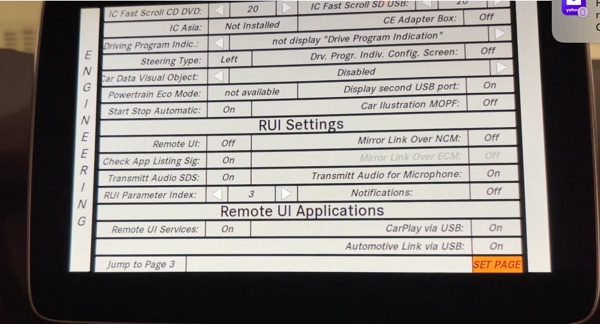
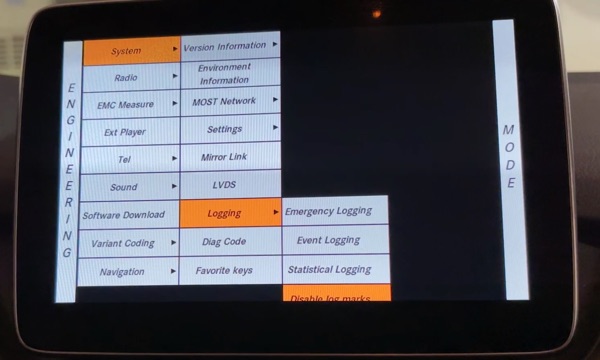
After reading on the internet, 2015-2018 Mercedes Benz B250e have NTG5.1 or NTG5S1 system that supports Apple CarPlay and Android Auto. My 2015 B250e has NTG5S1 and I tried to enable the CarPlay but it didn’t seem to work, even mirror link doesn’t see my iPhone 15 or 11. Looks like I have to get a after market unit to install.
1. Turn on ignition 1, enable Engineering Screen, hold (Hangup + 1 + #) together until the screen came up.
2. Go to System ->Logging -> Enable Log Marks.
3. Variant Coding ->Variant Coding Page 2-> Scroll down to near bottom to enable Remote UI Applications – Remote UI Services = ON, CarPlay via USB = ON, Automotive link via USB = ON.
4. Click Set Page to save.
5. Go Back to System – Press the Radio button for 10 sec until it shutdown and reboot.
6. If the software is good, in Tel option should have CarPlay, if NOT then the software is NOT able to run CarPlay.
7. Turn on Mirror Link and the iPhone 15 and iPhone 11 didn’t work either.